Loading...
Posts

LineChartMonitor 2024

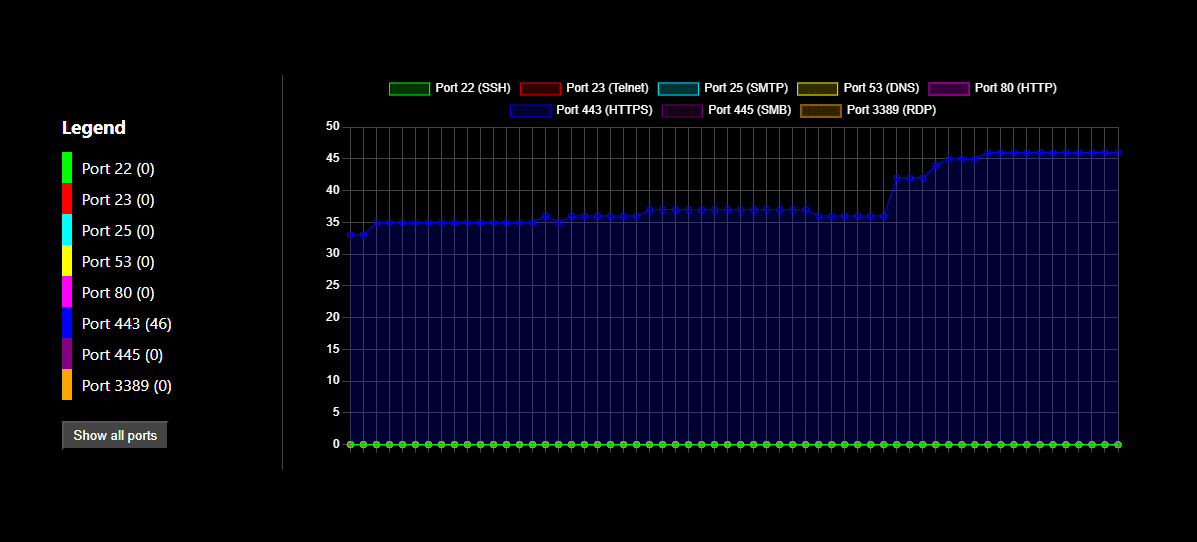
An application that visualizes network connections in real-time using a line chart. The chart displays the number of active connections per monitored port over time. This application leverages React, TypeScript, and Chart.js for dynamic data visualization.

  • LineChartMonitor

    Overview of the Code:
    The main component, manages the state of network connections, performs periodic polling to update data, and renders the chart using Chart.js. Axios is used to fetch data from the backend.

    
    import React, { useEffect, useState } from 'react';
    import { Line } from 'react-chartjs-2';
    import { Chart as ChartJS, CategoryScale, LinearScale, PointElement, LineElement, Title, Tooltip, Legend, Filler } from 'chart.js';
    import axios from 'axios';
    
    ChartJS.register(CategoryScale, LinearScale, PointElement, LineElement, Title, Tooltip, Legend, Filler);
    
    interface ConnectionCounts {
      port22: number[];
      port23: number[];
      port25: number[];
      port53: number[];
      port80: number[];
      port443: number[];
      port445: number[];
      port3389: number[];
    }
    
    const NetworkLineChart: React.FC = () => {
      const [chartData, setChartData] = useState<any>({
        labels: [],
        datasets: [],
      });
    
      const [timeLabels, setTimeLabels] = useState<string[]>([]);
      const [connectionCounts, setConnectionCounts] = useState<ConnectionCounts>({
        port22: [],
        port23: [],
        port25: [],
        port53: [],
        port80: [],
        port443: [],
        port445: [],
        port3389: [],
      });
    
      useEffect(() => {
        const fetchConnections = async () => {
          try {
            const response = await axios.get('http://127.0.0.1:5000/connections');
            const data = response.data;
    
            const counts = {
              port22: data.filter((conn: any) => conn.local_port === 22 || conn.remote_port === 22).length,
              port23: data.filter((conn: any) => conn.local_port === 23 || conn.remote_port === 23).length,
              port25: data.filter((conn: any) => conn.local_port === 25 || conn.remote_port === 25).length,
              port53: data.filter((conn: any) => conn.local_port === 53 || conn.remote_port === 53).length,
              port80: data.filter((conn: any) => conn.local_port === 80 || conn.remote_port === 80).length,
              port443: data.filter((conn: any) => conn.local_port === 443 || conn.remote_port === 443).length,
              port445: data.filter((conn: any) => conn.local_port === 445 || conn.remote_port === 445).length,
              port3389: data.filter((conn: any) => conn.local_port === 3389 || conn.remote_port === 3389).length,
            };
    
            const currentTime = new Date().toLocaleTimeString();
            setTimeLabels(prev => [...prev.slice(-59), currentTime]); 
            setConnectionCounts((prev: ConnectionCounts) => ({
              port22: [...prev.port22.slice(-59), counts.port22],
              port23: [...prev.port23.slice(-59), counts.port23],
              port25: [...prev.port25.slice(-59), counts.port25],
              port53: [...prev.port53.slice(-59), counts.port53],
              port80: [...prev.port80.slice(-59), counts.port80],
              port443: [...prev.port443.slice(-59), counts.port443],
              port445: [...prev.port445.slice(-59), counts.port445],
              port3389: [...prev.port3389.slice(-59), counts.port3389],
            }));
    
            setChartData({
              labels: [...timeLabels],
              datasets: [
                {
                  label: 'Port 22 (SSH)',
                  data: connectionCounts.port22,
                  fill: true,
                  backgroundColor: 'rgba(0, 255, 0, 0.2)',
                  borderColor: 'rgba(0, 255, 0, 1)',
                  borderWidth: 1,
                },
                {
                  label: 'Port 23 (Telnet)',
                  data: connectionCounts.port23,
                  fill: true,
                  backgroundColor: 'rgba(255, 0, 0, 0.2)',
                  borderColor: 'rgba(255, 0, 0, 1)',
                  borderWidth: 1,
                },
                {
                  label: 'Port 25 (SMTP)',
                  data: connectionCounts.port25,
                  fill: true,
                  backgroundColor: 'rgba(0, 255, 255, 0.2)',
                  borderColor: 'rgba(0, 255, 255, 1)',
                  borderWidth: 1,
                },
                {
                  label: 'Port 53 (DNS)',
                  data: connectionCounts.port53,
                  fill: true,
                  backgroundColor: 'rgba(255, 255, 0, 0.2)',
                  borderColor: 'rgba(255, 255, 0, 1)',
                  borderWidth: 1,
                },
                {
                  label: 'Port 80 (HTTP)',
                  data: connectionCounts.port80,
                  fill: true,
                  backgroundColor: 'rgba(255, 0, 255, 0.2)',
                  borderColor: 'rgba(255, 0, 255, 1)',
                  borderWidth: 1,
                },
                {
                  label: 'Port 443 (HTTPS)',
                  data: connectionCounts.port443,
                  fill: true,
                  backgroundColor: 'rgba(0, 0, 255, 0.2)',
                  borderColor: 'rgba(0, 0, 255, 1)',
                  borderWidth: 1,
                },
                {
                  label: 'Port 445 (SMB)',
                  data: connectionCounts.port445,
                  fill: true,
                  backgroundColor: 'rgba(128, 0, 128, 0.2)',
                  borderColor: 'rgba(128, 0, 128, 1)',
                  borderWidth: 1,
                },
                {
                  label: 'Port 3389 (RDP)',
                  data: connectionCounts.port3389,
                  fill: true,
                  backgroundColor: 'rgba(255, 165, 0, 0.2)',
                  borderColor: 'rgba(255, 165, 0, 1)',
                  borderWidth: 1,
                },
              ],
            });
          } catch (error) {
            console.error('Error fetching connections:', error);
          }
        };
    
        fetchConnections();
        const intervalId = setInterval(fetchConnections, 1000);
    
        return () => clearInterval(intervalId);
      }, [timeLabels, connectionCounts]);
    
      return (
        <div style={{ width: '80%', margin: '0 auto', marginTop: '20px' }}>
          <h2>Number of Connections per Port</h2>
          <Line data={chartData} options={{
            responsive: true,
            plugins: {
              legend: {
                display: true,
                position: 'top',
              },
            },
            scales: {
              y: {
                beginAtZero: true,
                min: 0,
                max: 2500,
              },
            },
          }} />
        </div>
      );
    };
    
    export default NetworkLineChart;
    
    • Backend Features:
      • Network Connections Monitoring:
        The backend continuously monitors active network connections, focusing on specific ports commonly used for various services like SSH, Telnet, SMTP, DNS, HTTP, HTTPS, SMB, and RDP.
© 2025 Diego Aneli // P.I : 03011930348

Privacy